
On a bus, an Oyster card with too little credit will let you make one more journey and then stop working until you top it up. On the Tube it works the other way round: the gate will not let you in unless the balance is at least the minimum fare from that station, but once you are through, the exit charge is adjusted to the real fare and the balance can end up below zero. Either way you finish the journey you are on. You cannot start another one until the card is back in credit.
These are not customs or rules of thumb. They are set out in Transport for London's Conditions of Carriage, the version in force from 24 September 2026, and they are worth knowing before the reader beeps at you in front of a queue. What follows is what the document actually says, what the beeps mean, and where to put money on the card when you are already inside a station.
The rules at a glance
- Entering a Tube or rail station
- Accepted if your pay as you go balance is at least the minimum fare from that station
- Leaving a Tube or rail station
- The entry charge is adjusted so you pay only the advertised fare for the journey made. That adjustment can take the balance negative
- Boarding a bus or tram
- If the balance is below the fare but not below £0.00, you get one more journey. Then the card must be topped up
- Green light, one beep
- Accepted
- Green light, three beeps (buses only)
- This is your one more journey. Top up before you travel again
- Red light, two beeps
- Rejected. You are not allowed to travel
- Contactless card or phone
- No balance to run out, so none of this applies
The bus rule: one more journey, and then nothing
The Conditions of Carriage put it plainly. If you are travelling by bus and the balance on your Oyster card is less than the fare for the journey but is not less than zero, you will be allowed to make one more journey. You must then top up to clear the negative balance before you can use the card again. The same applies if a Travelcard or Bus & Tram Pass on the card has just expired.
You will know it has happened because the reader gives a green light and three beeps rather than one. That is the signal that the driver's machine has let you on out of grace, not because you had the money. Ride the journey, then find a top-up point before you try to board anything else. Our guide to how London buses work covers the rest of the boarding routine.
Two limits on the concession are easy to miss. It works once, not once per bus, and it does not extend to the Tube, the DLR, the Overground, the Elizabeth line or the tram: the rule in the Conditions of Carriage is specific to buses. And the Hopper fare, which normally gives you unlimited further buses within an hour of your first tap, does not apply if the Oyster card has a negative balance after that first journey. If you clear the balance within the hour, the Hopper works again for the rest of it.
A negative balance freezes a Travelcard loaded on the same card. TfL's terms say a season ticket on an Oyster card can be used only while the pay as you go balance is not in debit. A 7 Day Travelcard you have already paid for stops working because you are 40p short on the credit beside it.
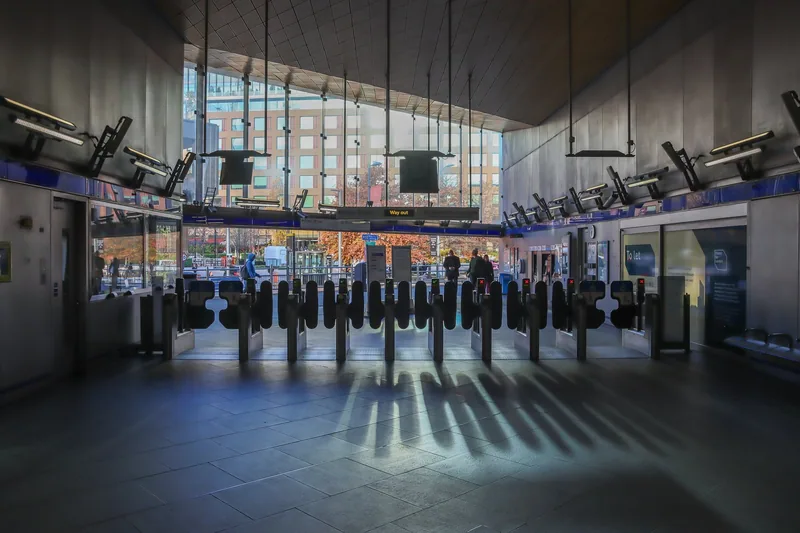
Photograph by Mike Peel (www.mikepeel.net) · CC BY-SA 4.0 · Wikimedia Commons · resized
The Tube rule: the gate lets you out, not in
For the Tube, DLR, Overground, Elizabeth line and National Rail, the Conditions of Carriage say your card will be accepted at the entry gate if your pay as you go balance is at least the minimum fare from that station. A charge set by TfL is deducted as you go in. When you touch out, that deduction is adjusted so you pay only the advertised fare for the journey you actually made.
That adjustment is the part people do not expect. If the fare for your journey is higher than the entry charge that was taken, the difference comes off a balance that may not have it, and the card goes below zero. TfL's own instruction is the sentence before: before travelling, you must have sufficient credit for the whole of your journey, or Auto top-up set on the card. In practice you will not be trapped inside the barriers. You will be let out, and the card will then be unusable until you clear the debt.
The other direction is stricter. A gate that shows a red light and gives two beeps has rejected the card, and the Conditions say you must not go any further until it has been accepted, you have used another card, or you have bought a ticket. Walking through an open gate anyway is how people end up in the conversation described in our guide to penalty fares and ticket inspectors.
Where to put money on the card when you are already at the station
Topping up is easy; knowing the list saves you walking. TfL sells top-ups at ticket machines at all Tube and London Overground stations and most Elizabeth line and National Rail stations, at some DLR stations, at Oyster Ticket Stops in several hundred newsagents across London, at Visitor Centres, at the Tramlink Shop in Croydon, through the free TfL Go app, and online through a contactless and Oyster account if you live in the UK.
For a visitor the practical short list is the ticket machine and the newsagent. Machines take contactless and chip-and-PIN cards as well as cash, and they are the fastest option at a Tube station. Oyster Ticket Stops are the answer late at night and in outer London, where the corner shop is open and the station ticket hall may not be staffed. The TfL Go app can add credit to a card too, which is worth setting up on your first evening rather than at a gateline; our round-up of the apps worth having in London explains what else it does.
One warning that catches people out at the exact moment it matters. The Conditions of Carriage state that you cannot start or end a journey using a yellow card reader on a station ticket machine. Touching your card on the reader built into a machine tops it up; it does not complete an incomplete journey. If the gate will not let you through after you have added credit, speak to the staff at the gateline, who have a portable reader.
The drill, in order
If the reader has just refused you, or given you three beeps on a bus, this is the sequence that gets you moving with the least fuss.
- Finish the journey you are on. On a bus you are allowed to. At a rail exit gate the adjustment happens whether or not the balance can stand it.
- Do not tap again on anything. A second attempt with a blocked card at a barrier is what turns an administrative problem into a conversation with an inspector.
- Pay for the next leg with a contactless card or phone instead. This is the fastest fix and it costs the same fare. Use one card consistently for the rest of the day so the cap still works.
- Top up the Oyster card when you are not in a hurry. A ticket machine at any Tube or Overground station, or a newsagent showing the Oyster sign. Clear the negative balance and the card works again immediately.
- If a Travelcard or Bus & Tram Pass is loaded on the card, clear the balance before you try to use it. The pass is frozen until you do.
One thing not to do: buying a second Oyster card does not solve it. The fee is £10.50 and it is not refundable on cards bought since September 2022, and the balance on the first card is still owed before that card can be used again.
The simplest fix is not to use an Oyster card at all
A contactless bank card or a phone has no stored balance, so it cannot run out. The fares are identical to Oyster, the daily and weekly caps are identical, and there is no £10.50 card fee to earn back. For most visitors on a short trip that settles it, and our comparison of Oyster and contactless works through the exceptions.
There are two real ones. Contactless carries no discounts of any kind: no child rate, no railcard reduction, no concession. If you need any of those, the discount has to sit on an Oyster card, and that card can run out of credit. And a foreign card may attract overseas transaction fees, which is a separate calculation covered in using a foreign bank card on London transport. Children under 11 travel free on buses and trams without any card at all, and free on the Tube with a fare-paying adult, so a family usually needs fewer cards than it thinks; see children's fares on London transport.
Keeping a small negative balance is not a fine. Clearing it costs exactly what you owe. There is no penalty, no administration charge and no effect on capping, provided you touched in and out properly.
Other cards, and what happens at the end of the trip
A 16+ Zip Oyster photocard behaves worse than a plain Oyster card: TfL's terms say that with a negative balance the holder cannot travel at all, including on the free bus and tram concession, until credit is added. If you need a replacement card because yours is lost or broken, any negative balance has to be cleared before TfL will replace it.
At the other end of the problem, leftover credit is refundable, and how you get it back depends on which card you have. A standard Oyster card with up to £10 on it can be refunded at a ticket machine, which then cancels the card. A Visitor Oyster card cannot be done at a machine at all: unused credit on those is refunded by phone or post only. Our page on Oyster refunds and deposits has the process, and the Visitor Oyster card explains why the two differ. If your problem is a charge you cannot account for rather than a balance that ran out, start with what happens if you forget to touch out, and if the last train has gone as well, the night bus that replaces your line takes contactless too.
Frequently asked questions
Can you go negative on an Oyster card?
Yes, in two situations. On a bus, if the balance is below the fare but not below zero, you are allowed one more journey and the card then shows a negative balance. On the Tube, the charge taken at the entry gate is adjusted at the exit gate to the real fare, and if the real fare is higher than the entry charge the balance can fall below zero. In both cases the card is unusable until the debt is cleared.
What happens if I do not have enough credit to get into a Tube station?
The gate rejects the card with a red light and two beeps, and Transport for London's Conditions of Carriage say you must not travel until the card has been accepted, you have used a different card, or you have bought a ticket. Add credit at a ticket machine in the ticket hall, or simply use a contactless bank card or phone instead.
Does the Hopper fare still work if my Oyster balance is negative?
No. TfL's terms state that the Hopper fare does not apply if the Oyster card has a negative pay as you go balance after the first journey. If you clear the negative balance within one hour of touching in, further journeys inside that hour are covered again.
Where can I top up an Oyster card late at night?
At an Oyster Ticket Stop, which is a newsagent or convenience shop displaying the Oyster sign, or in the TfL Go app on your phone. Ticket machines at Tube and Overground stations work whenever the station is open. Night buses accept contactless cards and phones, which need no topping up at all.
Will I be fined for having a negative Oyster balance?
No. You owe the amount of the shortfall and nothing more, and there is no penalty attached to it, as long as you touched in and out correctly. A penalty fare is a separate matter and applies when you travel without a valid ticket or fail to touch in.
Sources
- Transport for London - Conditions of Carriage, in force from 24 September 2026 (clauses 3.3, 3.5, 3.6, 3.9 and 6.1) (checked September 2026)
- Transport for London - Bus and tram fares, including "one more bus journey without charge" (checked September 2026)
- Transport for London - Where to buy tickets and Oyster, and where to top up (checked September 2026)
- Transport for London - Pay as you go with Oyster and contactless (checked September 2026)
- Transport for London - Touching in and out (checked September 2026)
- Transport for London - Apply for a refund of unused credit (checked September 2026)