
You need fewer apps for London than anywhere else in Europe, because the two things travel apps usually solve are already solved: you pay for transport by tapping the card or phone you already own, and there is no ticket to buy. Four or five apps genuinely help. The rest are answers to problems London does not have.
Start with what you do not need. There is no Tube ticket app, because there is no Tube ticket: contactless bank cards and phone wallets are the fare system, and the daily and weekly caps apply automatically, as our comparison of Oyster and contactless explains. You do not need a translation app. You do not need a sightseeing pass app unless you have bought a pass, and our page on whether the London Pass is worth it goes through those sums.
What is left is transport information, train tickets out of London, theatre tickets and one government app you may need before you even board your flight.
The short list
- Before you fly
- The official UK ETA app, if your nationality needs an Electronic Travel Authorisation
- Getting around
- TfL Go, plus one general maps app for walking
- Trains out of London
- Your train company's own app, or a National Rail retailer
- Theatre
- The theatre's own site, or the official Leicester Square ticket service
- Your bank's app
- The single most useful thing on your phone if a card is lost
- Not needed
- Any application for paying fares on the Tube, buses, DLR or most London rail journeys
TfL Go, and the things a map app will not tell you
Transport for London's own app is free, has no advertising and knows things the big map apps do not, because it is fed by the operator rather than by a data feed.
The obvious features are live arrivals for every bus, Tube, Overground, DLR, Elizabeth line, tram and the cable car, a live map showing disruption, and journey planning to any station, place or address. The ones that change a day are less obvious:
- Step-free mode. Plans a route that avoids stairs, and re-plans automatically when a lift is out of service. Useful with a suitcase or a pushchair, not only for wheelchair users. Our page on step-free travel explains how patchy the network still is.
- Station information. Facilities including where the toilets are, and an indication of quieter times, which is the closest thing to a crowding forecast.
- Walking and cycling routes for all or part of a journey, showing how much of a cycle route uses cycleways and where the hills are.
- Pay in TfL Go. Top up pay as you go credit, buy adult Travelcards and Bus & Tram Passes, check your journey history and resolve incomplete journeys, which is how you fix a maximum fare charged because you forgot to touch out.
- Line notifications for the specific lines you are using, which arrive before you reach the station.
That last point is the reason to have it during industrial action, when the picture changes from morning to afternoon. Our page on visiting during a strike explains how to read it.
Check "incomplete journeys" on the last evening of your trip. A missed touch-out charges a maximum fare, and both TfL Go and the online contactless and Oyster account let you resolve it yourself in a couple of minutes. Almost no visitor knows this, and the money is usually refundable.
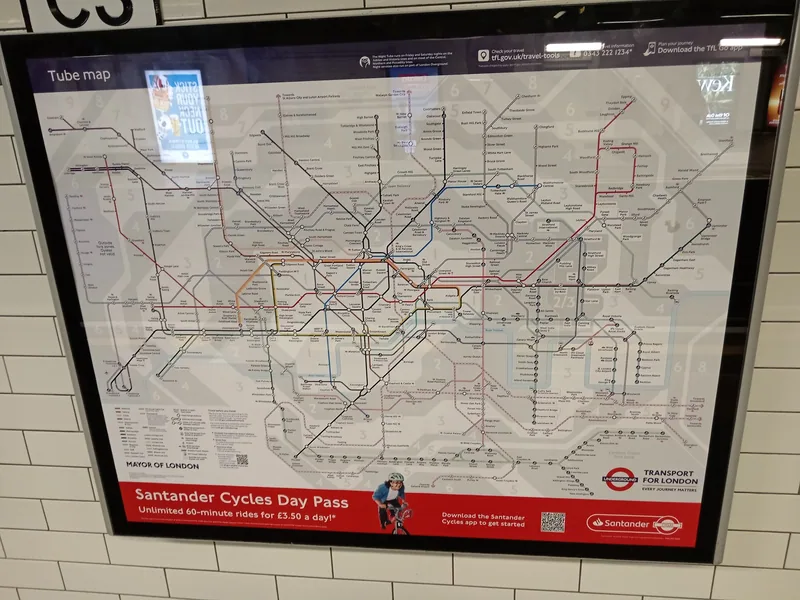
The maps question: Citymapper, Google or Apple
All three will get you there. The differences are real but smaller than the internet suggests.
| App | Strongest at | Weakest at |
|---|---|---|
| TfL Go | Live status, step-free routes, fares and account | Nothing outside London; no restaurants or shops |
| Citymapper | Comparing Tube, bus, walk, bike and taxi side by side; which carriage to board | Needs a connection for most of what it does well |
| Google Maps | Finding places, opening hours, offline maps, walking | Slower to reflect sudden line closures |
| Apple Maps | Walking directions on an iPhone, offline maps | Less depth on smaller businesses |
Two habits matter more than the choice. Save an offline map of central London before you arrive, because reception underground is patchy: TfL puts coverage at roughly one in two of the stations that lie below ground, with long stretches of tunnel still dark. And use spoken directions through earphones rather than walking with the phone held out, for the reasons our page on how pickpockets work sets out.
One thing no app is good at: telling you when walking beats the Tube. Covent Garden to Leicester Square is one stop underground and about four minutes above it. The trips where the pavement wins are set out in our guide to walking around London.
Trains out of London
This is the one area where an app saves real money, because National Rail fares vary enormously with when you buy. Advance tickets are for a specific train on a specific date, usually go on sale up to twelve weeks ahead, and are not refundable if you simply change your mind.
You have two sensible routes. Buy from the train company that runs the route, through its own app or website, or buy from a National Rail retailer that sells for all operators. The fares are regulated and the same either way; what differs is booking fees, seat reservation handling and how easy refunds are. Some retailers charge a booking fee and some do not, so check before you pay.
Whichever you use, the ticket is normally a barcode on the phone, and you will need it to leave the station at the far end as well as to enter. Screenshot it, because a dead signal at a barrier is a bad place to discover you need to log in. Our guide to buying UK train tickets explains Advance, Off-Peak and railcard fares in detail.
If you buy a railcard, it lives in the Railcard app rather than in the ticket app, and you must be able to show it when asked. Our page on railcards worth buying as a visitor covers which ones a non-resident can get.
The government app you may need before you fly
Most visitors now need an Electronic Travel Authorisation before travelling to the UK. It costs £20, lasts two years or until your passport expires, and each traveller needs one, including babies.
Apply through the official UK ETA app, available on Google Play and the App Store, or online through GOV.UK. Nothing else is the official route. GOV.UK states plainly that rival websites may charge more, and that none of them can speed a decision up, so ignore sponsored search results. A decision usually arrives by email within a day but can take up to three working days, and you must wait for the approval email before you travel. Who actually needs one is set out on our page about entry rules for visitors.
If you are driving in London, the equivalent official app is TfL's "Pay to drive in London", which handles the Congestion Charge and ULEZ. Again, unofficial sites charge a fee to do the same thing, as our page on the Congestion Charge and ULEZ notes.
Tickets for theatre and attractions
The cheapest West End seats do not come from a general ticket app. They come from day seats sold at the theatre in the morning, from the theatre's own ticket lottery, and from the official booth in Leicester Square, which has its own app. Our page on cheap theatre tickets lists the schemes worth setting an alarm for.
For paid attractions, book on the attraction's own website. Timed slots for the big sights sell out days ahead in summer, and a ticket bought through a reseller can be harder to change. Where a booking confirmation is a barcode, save it offline before you set out.
The boats, the bikes and the cable car
Three London services are easier with their own app, and one of them is impossible without it.
Santander Cycles. An ordinary pedal bike can be taken from the terminal at a docking station with a card. The electric ones cannot: TfL restricts e-bike hire to the app and to membership keys. A single ride is £1.65 for up to 30 minutes, a Day Pass starts at £3.50, and e-bikes cost £3 per 30 minutes (September 2026). Our guide to hiring a Santander Cycle covers the docking stations and the rules.
Uber Boat by Thames Clippers. Contactless and Oyster work at the pier, but the operator's own Tickets app sells season and multi-journey savers, and its weekday morning single is advertised at up to 25% below the pay as you go fare. River journeys do not count towards the daily cap, so the saving is real. See our page on the river bus.
The cable car. Booking online saves up to 30% on off-peak return trips booked seven days ahead, against £13.50 for an adult round trip on the day (September 2026). Our page on the London cable car has the opening hours.
Food, and the hotel address problem
Delivery apps work well in London, with one catch that catches visitors out: many hotels will not accept deliveries to a room, and some will not accept them at all. Ask reception before you order, and if the answer is no, arrange to meet the rider in the lobby.
For finding somewhere to eat rather than ordering in, restaurant booking apps are useful for the same-evening tables that a website will not show. Ratings on any of them reward places with many reviews, which in central London means chains and tourist-facing restaurants, so treat a high score on a street full of them with some suspicion. Our pages on cheap eats and late-night food are a better starting point for the middle of the night.
What you can delete before you fly
Several categories of app exist to solve problems that either do not exist here or are better solved another way.
- Currency converters. Useful for a five-second check, but prices here are in pounds with tax included and you will learn the conversion in a day.
- Tipping calculators. British restaurants add a discretionary service charge to the bill or leave it to you. There is nothing to calculate.
- Free Wi-Fi finder apps. Many are advertising vehicles, and some route your traffic through their own network. The free Wi-Fi that exists here is easy enough to find without one, as our page on free Wi-Fi in London explains.
- Generic "London guide" apps. Usually a repackaged website with an offline map you can get free from your maps app anyway.
- Bus and Tube "ticket" apps. There is no ticket. Tapping a bank card is the ticket.
- Hop-on hop-off apps, unless you have already bought a ticket for that operator.
The things that make every app fail
Three practical points decide whether any of this works on the day.
Battery. A flat phone is the single biggest risk: if it is also your ticket, an empty battery strands you at a gateline and earns you a maximum fare. Carry a power bank, and keep a plastic card in your pocket in reserve.
Data. TfL does not charge for mobile coverage on the Underground, so your own roaming rates apply underground exactly as they do above. Check what your operator charges for the UK specifically, since the country is outside the EU roaming rules; our page on SIM cards, eSIMs and roaming compares the options.
Two devices are not one device. If you touch in with a phone you must touch out with the same phone. A watch and a phone count as different cards, and mixing them breaks the daily cap.
Frequently asked questions
Do I need an app to use the London Underground?
No. Contactless bank cards and phone wallets are accepted at every gate, and the daily and weekly caps apply automatically, so there is no ticket to buy and no app required. TfL Go is worth installing for live status, step-free routes and to check your journey history, but you can travel the whole week without it.
Is Citymapper better than Google Maps for London?
Citymapper compares Tube, bus, walking, cycling and taxi options side by side and tells you which carriage to board for the exit you want, which is genuinely useful in central London. Google Maps is better for finding places, opening hours and offline maps. Many visitors use both, with TfL Go for live disruption.
Which app do I use to apply for a UK ETA?
The official UK ETA app, published by the Home Office and available on Google Play and the App Store, or the online route through GOV.UK. According to GOV.UK, other websites may charge more and none can obtain a quicker decision. The fee is £20 and every traveller needs one, babies and children included.
Can I hire a London e-bike without the app?
No. The terminal at a docking station will release a standard pedal bike, but TfL restricts e-bike hire to the app and to membership keys. About one bike in six in the scheme is electric, and they cost £3 per 30 minutes rather than £1.65 (September 2026).
Will my phone work on the Tube?
In roughly one station in two below ground, and along some tunnel sections, with the Elizabeth line covered throughout. Nothing is billed by TfL; what reaches you comes from your own mobile network, so roaming rates apply. Save maps and tickets to the device before you descend.
Sources
- Transport for London - TfL Go app (checked September 2026)
- GOV.UK - Get an electronic travel authorisation (ETA) to visit the UK (checked September 2026)
- GOV.UK - Using the UK ETA app (checked September 2026)
- Transport for London - Santander Cycles: what you pay (checked September 2026)
- Transport for London - Mobile coverage and station Wi-Fi (checked September 2026)
- National Rail - Advance tickets (checked September 2026)
- Uber Boat by Thames Clippers - Ticket information (checked September 2026)